

In the retail space, virtual makeup can be used to allow customers to try on lipstick and makeup without even having to visit the stores. In the movie industry, virtual makeup allows for touchups without the need for reshoots. In the events space, virtual makeovers can be part of an augmented reality experience.
While it is relatively straightforward for anyone to superimpose or overlay photos with transparent images/pngs, it is a little more challenging to make them look more well-aligned and photo realistic. And even more challenging to repeat the task for an entire video footage containing many frames.
Today, we will explore how computer vision can be used to implement virtual makeup, powered by facial landmark detectors.
What is a facial landmark detector?
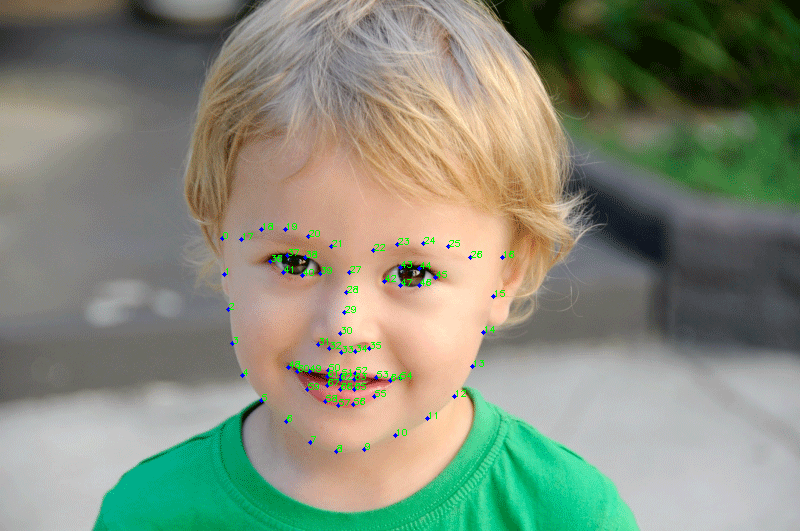
As the name suggests, it is used to detect facial landmarks on a human face. For example, the eyes, the nose, the mouth are all examples of facial landmarks on a human face. We will use a 68-point landmark detector for illustration. In the image below, you will see 68 points detected on a human face. Once we have detected the landmarks, it will now be easier to apply virtual makeup to the different regions of the face.
Santa's Beard
Some fun effects do not need to be precisely aligned, and can be relatively simple and fun to create. In this example below, after detecting the facial landmarks of the chin region [5-11], we can neatly scale and position the beard overlay.
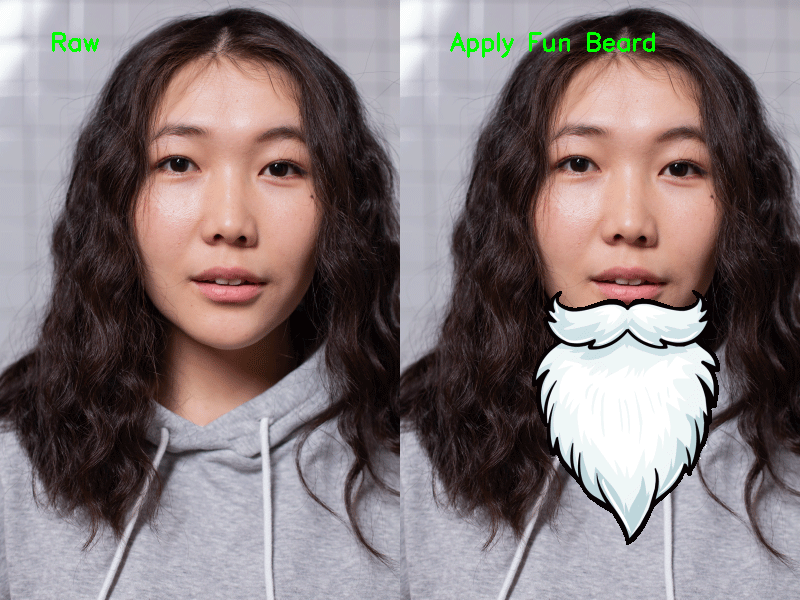
Simple overlays are nice for a fun application. But sometimes, we may need to create a more natural, photo realistic outcome. Can we create that effect without the image looking "manipulated"?
Lipstick
Below, we apply virtual lipstick by subtly increasing the colour saturation over the detected lips region [points 48-59].
- Detect the Lips Region and create an image mask
- Dilate the image mask to increase the size of the region slightly.
- Convert the region into the HSV colour space, and increase the colour saturation. This produces a more saturated red at the lips area, effectively applies the "lipstick" while blending smoothly into the surrounding regions. This allows the image to maintain a more natural look, in contrast to the beard example above.

Eyelashes
To overlay eyelashes realistically, it requires even more precise alignment to align with the edges of the eyelids.
- Load the left and right eyelashes (drawn using a different person's face)
- Prepare the alpha mask, and feature point coordinates of the eyelashes relative the original facial landmarks
- Calculate Delaunay Triangulation for the feature points
- Warp the eyelashes and alpha mask to fit the detected face
- Merge the warped eyelashes with the image, using the warped alpha mask

To get a more realistic alignment for the eyelashes overlay, we applied facial landmark detection, followed by Delaunay triangulation, and finally used the triangulation to warp the overlay to align with the subject's facial landmark positions. In this way, the overlay of eyelashes could be neatly aligned to the edges of the eyelids. Going further, we test the algorithm on a video below. Notice how the applied eyelashes follow the outline of the eyes as the subject blinks and moves her eyes. Success!
What's Next?
Making use of a variety of these techniques, a magic mirror can be created to give people an immersive experience where they get to look at themselves or their surroundings through different lenses. It might be fun to create different activations of art, that interact with the visitors. The next time you see a "mirror" at the retail store, check to see if it is a real mirror. Or perhaps, it might be a magic mirror powered with augmented reality capabilities.
